6 Multi Currency Invoicing Features Finance Teams Need

Yes, you can invoice customers in their own currency, and you should whenever it speeds up payment. Use invoicing software with per-invoice currency support connected to a payment gateway that actually processes that currency, such as Stripe. Some invoicing platforms handle this pairing directly. The one catch: billing in foreign currency means someone on your team has to track exchange-rate movement between invoice date and payment date, or your books won’t reconcile.
TL;DR:
- Using invoicing software that supports per-invoice currency and connects to a compatible payment gateway like Stripe ensures smooth international transactions.
- Billing in a client’s local currency accelerates payment, reduces disputes over exchange rates, and offers a competitive edge in foreign markets.
- Properly tracking and documenting exchange rates, handling partial payments in original currencies, and managing FX gains and losses are essential for accurate bookkeeping.
- Confirming gateway support for the specific currency before invoicing prevents payment delays caused by unsupported currencies or mismatched settings.
- Automating exchange-rate updates, recurring billing, and payment status synchronization streamlines multi-currency invoicing, especially at higher volumes.
Table of Contents
- What Is Multi-Currency Invoicing and When Should You Use It?
- Why Bill Clients in Their Own Currency?
- What Features Should You Require From Invoicing Software?
- How Do You Create and Send a Multi-Currency Invoice?
- How Do Exchange Rates Affect Your Books?
- Is Multi-Currency Invoicing the Same as E-Invoicing?
- What Goes Wrong With Multi-Currency Invoicing?
- How Do You Explain Currency Details to International Clients?
- Can You Automate Multi-Currency Invoicing?
- Why InvoiceLabs Fits Multi-Currency Billing
- Primary Sources and Further Reading
- Get Started With Multi-Currency Invoicing
- Sources
What Is Multi-Currency Invoicing and When Should You Use It?
Multi-currency invoicing means issuing an invoice denominated in a currency other than the one your business reports in. Your accounting base currency stays fixed, say, US dollars, but individual invoices can be created in euros, British pounds, or Japanese yen depending on the client. This is different from simply converting a number for reference; the invoice itself is legally and financially denominated in that other currency.
You want this capability for a few specific situations:
- Long-term retainer clients based in a single foreign market
- Contracts already priced in a local currency by agreement
- Clients who explicitly request billing in their own currency to simplify their own approval process
- Markets where local competitors bill in-market currency and quoting in dollars makes you look like an outsider
The trade-off worth weighing before you commit: billing in a client’s currency shifts the exchange-rate risk onto you, not them. That’s a fair price for faster, friction-free payment, but it’s not free.
Why Bill Clients in Their Own Currency?
Clients pay faster when they understand exactly what they owe without doing mental math or calling their bank. That’s not a soft benefit. Confusion over converted amounts is one of the most common reasons a foreign-currency invoice sits unpaid past its due date, because the client’s finance team hesitates to approve a number they have to verify themselves.
Billing in local currency also removes a quiet source of client friction:
- Faster approval cycles, since finance departments abroad don’t have to route the invoice through a currency-conversion check
- Fewer disputes over “the bank converted it differently than I expected”
- A perception edge in competitive bids, since local-currency pricing reads as more serious to procurement teams evaluating international vendors
- Simpler expense matching on the client’s side, since their books already record the transaction in their own currency
Pro Tip: Print the exchange rate you used and your conversion policy directly on the invoice. A one-line note like “Rate locked at time of issue: 1 GBP = 1.27 USD” heads off almost every “why does this not match my bank statement” email before it starts.
What Features Should You Require From Invoicing Software?
Not every invoicing tool that claims “multi-currency support” actually delivers what a finance team needs. Before you commit to a platform, confirm it handles these six things:
- Per-invoice currency control. You need to set currency at the invoice level, not just the account level, with line items and tax calculated correctly in that currency.
- Payment gateway compatibility matching invoice currency. Stripe’s invoicing documentation is explicit here: you must pass a currency parameter when creating the invoice, and the invoice only pulls line items already denominated in that same currency.
- Transparent exchange-rate sourcing. The platform should show you which rate it used, when it was pulled, and let you lock or manually override that rate with a visible audit trail.
- Multi-currency reporting with separate currency balances. You need to see what’s owed in each currency independently, not one blended number that hides your actual FX exposure.
- Credit notes and partial payments across currencies. A client who pays 60% of a euro invoice needs that partial payment and any resulting credit note handled in euros, not silently converted to your base currency.
- API access, security, and branding controls. Bank-grade security and the ability to keep your logo and formatting consistent matter just as much on a foreign-currency invoice as a domestic one.
Any platform missing more than one or two of these will cost you hours in manual reconciliation later.
How Do You Create and Send a Multi-Currency Invoice?
Setting up your first foreign-currency invoice takes longer to read about than to actually do, once the groundwork is in place.
- Set the client’s billing currency on their record. Most platforms let you assign a default currency per client so you’re not choosing it manually every time you invoice them.
- Choose the per-invoice currency and confirm line items. Check that tax treatment (VAT, sales tax, or a zero-rate for export) is calculated correctly for that specific currency and jurisdiction, not just carried over from a template.
- Connect a payment gateway that processes that currency. Stripe supports a wide range of currencies for invoice payment, but you need to verify the specific currency you’re billing in is enabled on your account before you send anything. Test the payment flow with a small invoice first.
- Record the exchange rate you used. Whether the platform pulled it automatically or you set it manually, note the rate and timestamp on the invoice itself.
- Send it, then track delivery and payment status. Record the payment in the original invoice currency when it lands, not a converted approximation.
- Handle partial payments, refunds, and credit notes in that same original currency. This is the step people skip, and it’s the one that breaks reconciliation two months later when the books don’t match.
Pro Tip: Send a test invoice to yourself before billing a real client in a new currency. It catches gateway-currency mismatches (a currency enabled in your invoicing tool but not activated on your payment account) before they cost you a delayed payment.
How Do Exchange Rates Affect Your Books?
Your invoice currency and your accounting base currency are stored as two separate values, which is exactly how it should work. The invoice says €5,000. Your books convert that to dollars at the rate on the day you recognize the revenue, and again at the rate on the day you actually receive payment. Those two rates are rarely identical, and the gap between them is where gains and losses live.
Here’s the timeline that trips people up: you issue a €5,000 invoice on March 1 when the rate is 1.08 dollars per euro, so your books show $5,400 as an unrealised gain or loss while the invoice sits open. The client pays on March 25, when the rate has moved to 1.11. You’ve now collected the equivalent of $5,550. That $150 difference becomes a realised gain, booked only once cash actually lands.
Reconciling this cleanly takes a few habits:
- Keep separate currency ledger accounts rather than converting everything to base currency the moment an invoice is created
- Record the rate and its source (bank rate, market rate, platform-provided rate) on every transaction, not just the total
- Run a periodic FX gain/loss report, monthly at minimum, so currency swings don’t surprise you at year-end
- Account for partial receipts and bank conversion fees separately. A wire that arrives short of the invoiced amount because the receiving bank skimmed a conversion fee is not a client dispute; it’s a banking cost that needs its own line in your reconciliation.
Is Multi-Currency Invoicing the Same as E-Invoicing?
No, and mixing these up causes real compliance problems. Multi-currency invoicing is a billing choice, what currency your invoice is denominated in. E-invoicing is a separate, often government-mandated process requiring structured, machine-readable invoice formats submitted through specific reporting channels.
A few things worth knowing before you assume you’re covered:
- Sending a PDF invoice in euros to a French client satisfies multi-currency invoicing but does nothing for e-invoicing mandates if France requires structured submission through a network like Peppol.
- Some businesses need both: multi-currency support for the client relationship, and format transformation to local mandated standards for tax authority compliance.
- Requirements change by country and by client type, so check your specific recipient’s mandate status before assuming a PDF is enough, especially as more governments expand e-invoicing rules over the next few years.
What Goes Wrong With Multi-Currency Invoicing?
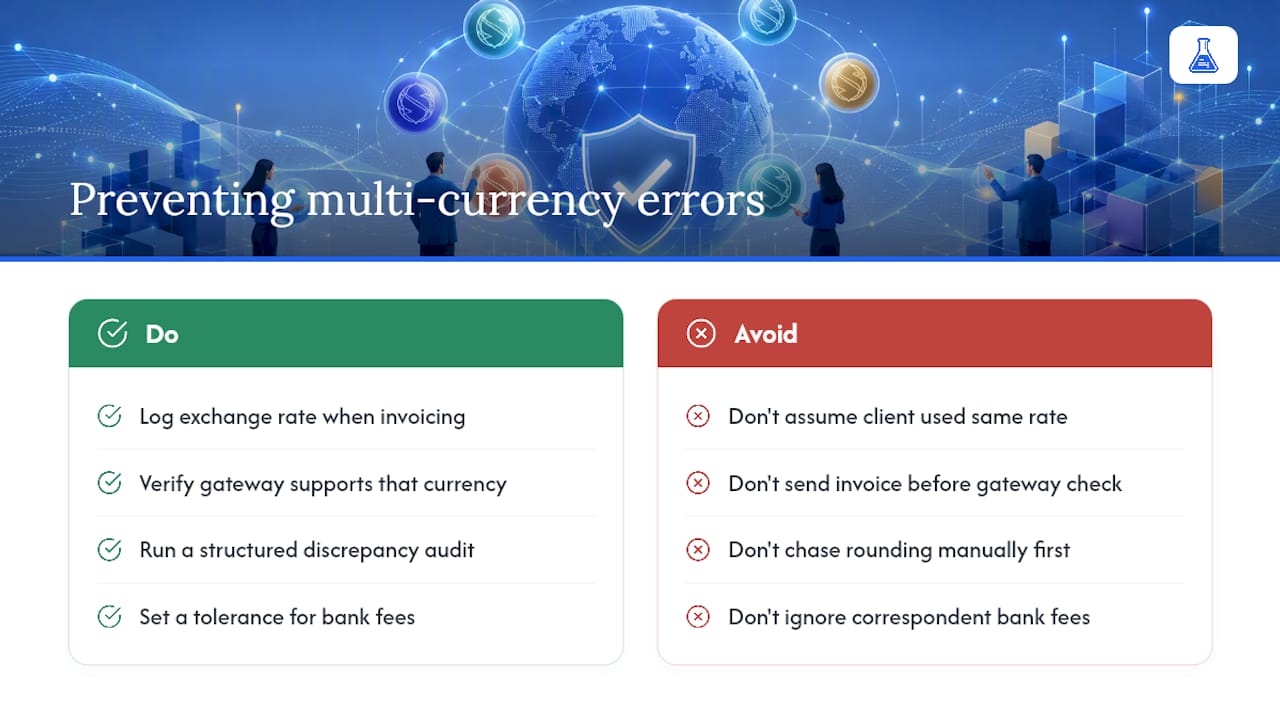
The most common failure isn’t a software problem, it’s a process gap. Someone bills in euros, the client pays in euros, and then nobody records which exchange rate applied, so the finance team spends an afternoon at month-end trying to reverse-engineer a number that should have been logged in five seconds.
A second recurring issue: gateway mismatch. You set an invoice to bill in Australian dollars, but your Stripe account never had that currency activated for payouts. The invoice looks fine to the client until they try to pay and hit a wall. Always verify gateway currency support before you send, not after a client complains.
Rounding errors compound quietly, too. A rate that’s off by even a tenth of a cent on a $50,000 invoice creates a discrepancy that looks like an accounting error but is really just an FX rounding artifact. If you’re chasing a mismatch like this, a structured discrepancy audit usually finds it faster than re-checking the invoice line by line.
Bank fees are the pitfall people underestimate most. International wire transfers often arrive short of the invoiced total because a correspondent bank took a cut somewhere in transit. If your process doesn’t flag underpayments automatically, you’ll write off legitimate revenue as a client error. Build a standard tolerance threshold, a few dollars either way, so real discrepancies get flagged without every routine bank fee triggering a client email.
Finally, currency volatility during long payment terms is a real exposure. A 60-day payment term on a foreign invoice means 60 days of rate movement you’re absorbing. If a client consistently takes the full term to pay, consider shortening terms for foreign-currency invoices specifically, not as a blanket policy across your whole client base.
How Do You Explain Currency Details to International Clients?
Clarity on the invoice itself prevents more disputes than any follow-up email ever will. State the currency explicitly next to every amount, not just as a three-letter code buried in a header. “$5,000 USD” reads faster than a client having to hunt for a currency symbol that might not even render correctly across every device or printer.
Put your conversion policy in writing, once, in your engagement terms, so it’s not a surprise mid-project. Something as simple as “invoices are issued in your local currency at the rate in effect on the invoice date; bank fees are the client’s responsibility” removes an entire category of back-and-forth before it starts.
When you do need to reference a converted figure, for internal comparison or a contract that’s priced in your home currency, put the conversion in parentheses and label the rate source and date. Clients respect a rate they can verify against their own bank far more than a number that just appears without explanation.
If you invoice the same client repeatedly, agree on payment terms upfront and put them in writing. Clear payment terms covering due dates, accepted payment methods, and what happens with partial payments prevent almost every cross-border misunderstanding before it becomes a real one.
Can You Automate Multi-Currency Invoicing?
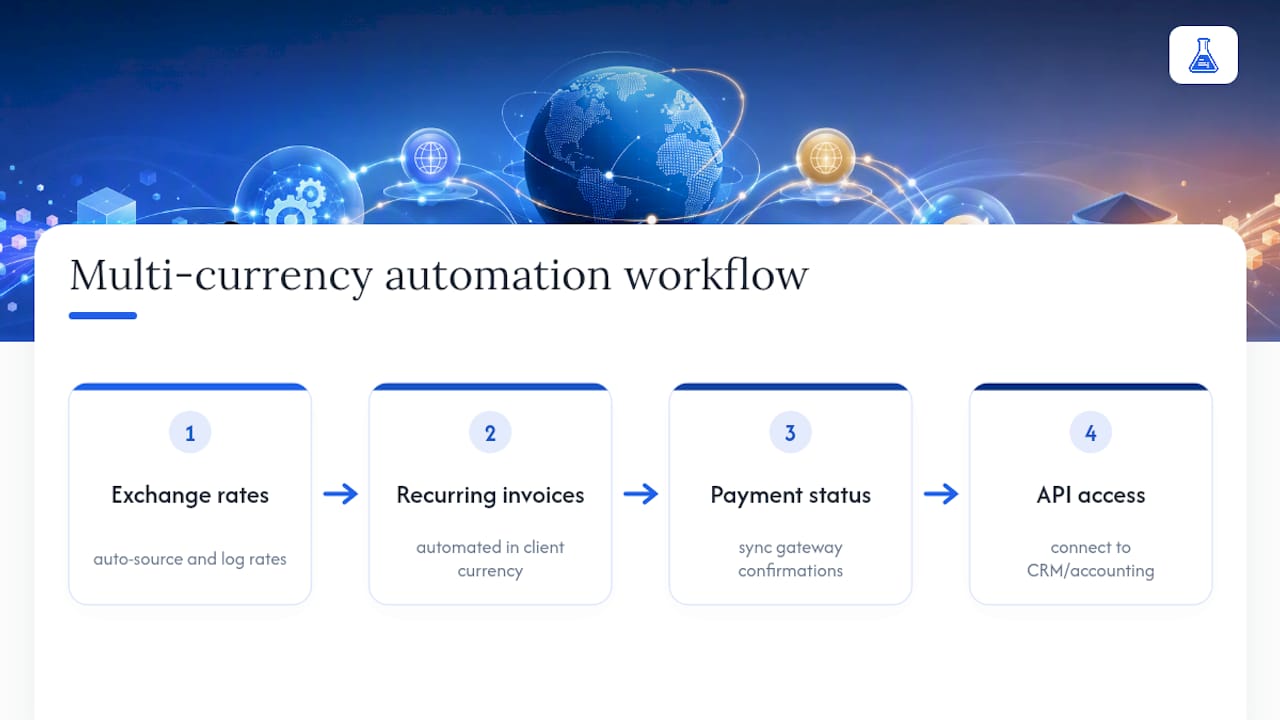
Manual currency tracking works for two or three foreign clients. Past that, it becomes the kind of repetitive task that quietly eats a full workday every month, and it’s exactly the sort of process that automation was built to remove.
The core automation worth setting up first is exchange-rate sourcing. Instead of manually looking up a rate every time you issue an invoice, a platform that pulls current rates automatically and logs them against each invoice removes both the lookup time and the risk of using a stale number.
Recurring billing is the second win. If you invoice the same international client monthly, automated recurring invoices in their set currency remove the need to rebuild the invoice from scratch every cycle, and they cut down on the small clerical errors that creep in when someone’s rebuilding a template by hand.
Payment status tracking closes the loop. When a gateway like Stripe confirms payment, that status should flow back into your invoicing platform automatically rather than requiring someone to log in and mark it paid manually. That single integration point, invoice creation talking directly to payment confirmation, is usually where multi-currency workflows either hold together or fall apart at scale.
API access matters most for businesses issuing a high volume of foreign-currency invoices, since it lets you connect invoicing directly to whatever CRM or accounting system already runs your operation, rather than duplicating data entry across three separate tools.
Why InvoiceLabs Fits Multi-Currency Billing
Some invoicing platforms support per-invoice currency selection, so you’re not locked into one billing currency across your entire client base. Integration with payment gateways like Stripe can handle the payment side directly, meaning clients pay in the currency the invoice was issued in, and payment status updates can be seen in real time rather than checking a bank manually.
For a freelancer billing a UK client in pounds and a US client in dollars the same week, that flexibility removes an entire layer of manual tracking. Maintaining brand consistency across invoices and quick invoice creation can help avoid sacrificing speed despite the extra complexity of billing internationally.
Try building one now with the free invoice generator or start from a profession-specific template built for international billing.
Primary Sources and Further Reading
- Stripe multi-currency docs: technical setup reference
- Invopop: Peppol and compliance infrastructure
Get Started With Multi-Currency Invoicing
Some invoicing platforms are designed for freelancers, consultants, and agencies who need to bill international clients efficiently. There are platforms that put per-invoice currency selection and payment collection integration prominently where invoices are created, making billing clients in different currencies straightforward and quick.

If you’re already juggling multiple currencies by hand, in spreadsheets or a tool that treats foreign billing as an afterthought, that’s the exact friction InvoiceLabs removes. Features like real-time tax calculation that adjust to each invoice’s currency and jurisdiction automatically, plus instant delivery with status tracking, help users know when invoices are opened as well as when payment clears.
Create your first multi-currency invoice with the free invoice generator and see how fast international billing can actually be.
Sources
- Multi-currency customers | Stripe Documentation
- International invoicing | eConnect
- Invopop — The invoicing infrastructure for global businesses
Recommended
Send your next invoice in seconds
Create professional invoices, track payments and get paid faster — free to start.


