Is QuickBooks Good for Invoicing? A 2026 Guide
QuickBooks is defined as a full accounting platform that includes professional invoicing as one of its core features, making it a strong choice for small businesses that need more than just a billing tool. The platform serves over 7 million small businesses globally and is backed by 700,000+ ProAdvisors who recommend it to clients. That scale reflects real-world trust. Whether QuickBooks is good for invoicing depends on one key factor: how much of your business runs beyond the invoice itself. If you need integrated accounting, tax management, and payment tracking in one place, QuickBooks delivers. If you only need fast, simple billing, it may be more than you need.
Is QuickBooks good for invoicing? What the features actually show
QuickBooks invoicing covers the full cycle from creation to collection. You can build branded, professional invoices in minutes, accept online payments via credit card, ACH transfer, and Apple Pay, and set up automated reminders so clients never miss a due date. The platform also supports recurring billing, which saves time for freelancers and service businesses with retainer clients.
The QuickBooks invoicing features that stand out most are real-time payment tracking and AI-assisted invoice creation. Real-time tracking tells you exactly when a client opens an invoice and when payment clears. AI assistance speeds up the drafting process by pulling in client details, line items, and tax rates automatically.

Mobile optimization is another practical strength. You can create and send invoices from your phone on the way out of a client meeting. That kind of flexibility matters for contractors, consultants, and field service providers who are rarely at a desk.
Key invoicing capabilities in QuickBooks include:
- Branded invoice templates with your logo, colors, and custom fields
- Online payment acceptance via QuickBooks Payments, including credit cards and ACH
- Automated payment reminders sent on a schedule you control
- Recurring invoices for subscription or retainer billing
- Real-time status tracking showing when invoices are viewed and paid
- AI-powered invoice creation that pulls client and product data automatically
- Mobile invoicing optimized for iOS and Android
The integration with QuickBooks’ full accounting system is what separates it from standalone invoicing tools. Every invoice you send automatically updates your books, feeds into tax reports, and reconciles with your bank transactions. That tight loop eliminates double entry and reduces errors.
Pro Tip: Turn on automated payment reminders for invoices at 3 days before due, on the due date, and 3 days after. This three-touch sequence captures most late payers without requiring manual follow-up.
How does QuickBooks pricing affect its invoicing value?
QuickBooks Online’s entry-level plan starts at approximately $35–$38 per month as of mid-2026. That price point includes the Simple Start plan, which covers basic invoicing, expense tracking, and single-user access. It is a meaningful monthly cost compared to free or low-cost invoicing tools.
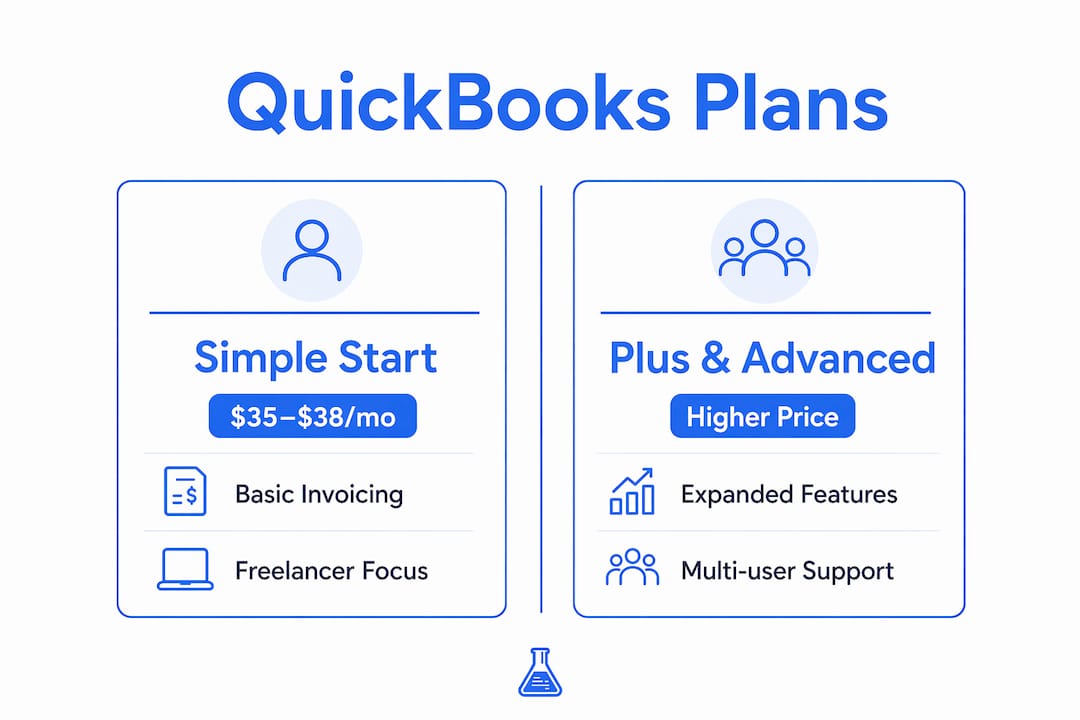
| Plan tier | Approx. monthly cost | Key invoicing-relevant features |
|---|---|---|
| Simple Start | $35–$38/month | Invoicing, payments, expense tracking, 1 user |
| Essentials | Higher tier | Adds bill management, 3 users, time tracking |
| Plus | Higher tier | Adds inventory, project tracking, 5 users |
| Advanced | Highest tier | Adds custom reporting, 25 users, dedicated support |
For a freelancer who sends 10 invoices a month and has no employees, the Simple Start plan covers the basics. The cost becomes harder to justify when you compare it to free invoicing tools that handle the same core task. The math changes, though, when you factor in what QuickBooks replaces: a separate bookkeeping tool, a tax prep spreadsheet, and the hours spent reconciling them manually.
Ecosystem familiarity often justifies the subscription cost. If your accountant already works in QuickBooks, you eliminate the time and friction of exporting data, converting file formats, and explaining your books every quarter. That coordination saving has real dollar value.
Pro Tip: If you are evaluating QuickBooks purely for invoicing, calculate your current admin hours per month and multiply by your hourly rate. If QuickBooks’ automation saves you even 2 hours monthly, the subscription often pays for itself.
What business types benefit most from QuickBooks invoicing?
QuickBooks invoicing fits best when invoicing is one part of a larger financial operation. Businesses whose accountants already use QuickBooks gain the most immediate value. Shared data means fewer errors, faster reconciliation, and no translation layer between your records and your accountant’s.
Growing small businesses with inventory, payroll, or multiple team members also get strong value. QuickBooks invoicing connects directly to inventory counts, so you never invoice for stock you do not have. Payroll integration means labor costs flow into your financial reports without manual entry.
Business types that benefit most from QuickBooks invoicing:
- Service businesses with retainer clients who need recurring invoices and payment tracking
- Contractors and consultants who bill by project and need time tracking tied to invoices
- Small businesses with accountants already working in the QuickBooks ecosystem
- Growing businesses that need invoicing to connect with inventory, payroll, and reporting
- Multi-user teams where more than one person creates or manages invoices
The coordination friction reduction is a hidden benefit that many businesses underestimate. When your invoicing, banking, and accounting all live in one system, discrepancies surface immediately rather than at year-end. That saves real administrative time and reduces the risk of costly errors.
Businesses with inventory, payroll, or multi-entity needs find QuickBooks’ invoicing integrated and scalable in ways that basic invoice apps cannot match. A graphic design agency billing 30 clients monthly while managing contractor payments and software subscriptions gets a genuinely unified financial picture from QuickBooks.
What are the common limitations of using QuickBooks for invoicing?
QuickBooks invoicing is not the right fit for every business. The platform’s biggest drawback for invoicing-focused users is that invoicing feels like a feature subset of a larger accounting system rather than the main event. That design choice creates a steeper learning curve for anyone who just wants to send a bill.
The limitations worth knowing before you commit:
- Steep learning curve. The interface is built for accountants as much as business owners. New users often spend time learning navigation before they send their first invoice.
- Cost vs. need mismatch. At $35–$38 per month, the entry-level plan is expensive if invoicing is your only use case.
- Complexity for microbusinesses. Sole proprietors and freelancers with simple billing needs often find the full accounting environment distracting and unnecessary.
- Overkill for basic billing. If you send fewer than 20 invoices a month with no inventory or payroll, QuickBooks may be more tool than you need.
- Dedicated tools are simpler. Invoicing-first platforms are built around the billing workflow, making them faster and more intuitive for users who do not need accounting depth.
The honest assessment is this: QuickBooks is a great invoicing tool inside a great accounting platform. If you need the accounting platform, the invoicing is a bonus. If you only need the invoicing, you are paying for a lot of features you will never use. For freelancers and solo operators, a dedicated invoicing tool often delivers a faster, cleaner experience at a fraction of the cost. The billing and invoicing guide for freelancers from Invoicelabs breaks down how to evaluate that tradeoff based on your actual workflow.
How to use QuickBooks for invoicing to get paid faster
Getting the most out of QuickBooks invoicing comes down to using the automation features consistently. Most users set up the basics and stop there, leaving significant time savings on the table.
- Set up automated payment reminders. Go to Account Settings, then Sales, and configure reminder schedules. Automated reminders increase payment speed by up to 45%, which is the single highest-impact setting in the invoicing workflow.
- Customize your invoice template. Add your logo, brand colors, and a personalized payment message. Professional presentation builds client trust and reduces the likelihood of disputes that delay payment.
- Enable QuickBooks Payments. Adding a “Pay Now” button to every invoice removes friction from the client’s side. Clients can pay by credit card or ACH without logging into a separate portal.
- Use recurring invoices for repeat clients. Set up a recurring billing schedule for any client you invoice more than once a month. This eliminates manual invoice creation and ensures you never forget to bill.
- Review the payment tracking dashboard weekly. QuickBooks shows you which invoices are viewed, unpaid, and overdue in one screen. A weekly review lets you follow up before accounts become seriously past due.
- Let AI handle the first draft. QuickBooks’ AI invoice creation pulls client details and previous line items automatically. Use it as your starting point and adjust, rather than building each invoice from scratch.
Pro Tip: Connect QuickBooks to your business bank account from day one. Every payment that comes in will match automatically to the corresponding invoice, keeping your books accurate without any manual reconciliation.
AI automation in QuickBooks can save SMB owners over 5 hours weekly by reducing manual admin work across invoicing and bookkeeping tasks. Five hours a week is 20 hours a month you can redirect to billable work.
Key Takeaways
QuickBooks is a strong invoicing tool for businesses that need integrated accounting, but it is more than most freelancers require for simple billing.
| Point | Details |
|---|---|
| Integrated accounting advantage | Every invoice syncs automatically with your books, eliminating double entry and reconciliation errors. |
| Pricing reality | Entry-level plans cost $35–$38/month, which is only justified when you use the broader accounting features. |
| Best-fit businesses | Businesses with accountants, inventory, or payroll get the most value from QuickBooks invoicing. |
| Automation saves time | Automated reminders and AI invoice creation can save over 5 hours of admin work per week. |
| Freelancers may need less | Solo operators focused purely on billing often find dedicated invoicing tools faster and more affordable. |
My take on when QuickBooks invoicing is actually worth it
QuickBooks earns its place when invoicing is one thread in a larger financial operation. I have seen small business owners waste months trying to make a basic invoicing tool work alongside a separate accounting system, only to switch to QuickBooks and immediately cut their month-end close from two days to two hours. The integration is genuinely that powerful when your business has real complexity.
That said, I think the conventional wisdom oversells QuickBooks for freelancers. If you are a designer, writer, or consultant sending invoices to a handful of clients each month, you do not need double-entry accounting built into your billing tool. You need something fast, professional, and easy to use. QuickBooks is none of those things for a first-time user with simple needs.
The question I always ask is: does your accountant use QuickBooks? If yes, the subscription pays for itself in coordination savings alone. If no, and your business does not have inventory or payroll, start with a dedicated invoicing tool and revisit QuickBooks when your financial complexity grows. The QuickBooks alternatives for 2026 are genuinely good now, and there is no shame in using the right tool for your current stage rather than the most powerful one available.
The businesses that get burned by QuickBooks are the ones who buy it for invoicing alone, get overwhelmed by the interface, and end up using neither the invoicing nor the accounting features properly. Fit matters more than features.
— Black Flame Digital
A faster invoicing option worth knowing about
If QuickBooks feels like more than your business needs right now, Invoicelabs is built specifically for the billing workflow. You can create a professional, branded invoice in under 30 seconds, send it instantly, and track payment status in real time without navigating a full accounting platform.

Invoicelabs supports real-time tax calculations, Stripe-powered payment collection, and bank-grade security with no hidden fees. It is designed for freelancers and small business owners who want to get paid fast without the overhead of a full accounting system. Consultants can start with a free consultant invoice template, or use the free invoice generator to send your first invoice in minutes. Whether you use it alongside QuickBooks or as a standalone tool, Invoicelabs keeps the billing process simple and professional.
FAQ
Is QuickBooks good for invoicing as a freelancer?
QuickBooks works for freelancers but is often more complex and expensive than needed for simple billing. Freelancers who only need to send invoices and track payments typically find dedicated invoicing tools faster and more cost-effective.
What does QuickBooks invoicing cost per month?
QuickBooks Online’s entry-level plan starts at approximately $35–$38 per month as of mid-2026. That price includes basic invoicing, expense tracking, and single-user access under the Simple Start plan.
Does QuickBooks automatically track invoice payments?
Yes. QuickBooks shows real-time invoice status, including when a client opens an invoice and when payment is received. Payments made through QuickBooks Payments reconcile automatically with your accounting records.
How does QuickBooks invoicing compare to standalone invoicing tools?
QuickBooks integrates invoicing with full accounting, tax management, and reporting, which standalone tools do not offer. Standalone tools are simpler, often free, and better suited for businesses that only need billing without broader financial management.
Can QuickBooks send automatic payment reminders?
Yes. QuickBooks lets you configure automated reminder schedules before, on, and after invoice due dates. Automated reminders increase payment speed by up to 45%, making them one of the most effective features in the platform.
Recommended
Send your next invoice in seconds
Create professional invoices, track payments and get paid faster — free to start.


