Billing & Invoicing Guide for Freelancers and Small Businesses

Billing & invoicing are two distinct but connected processes that determine how fast you get paid and how well you manage cash flow. Billing is the end-to-end process of charging customers for goods or services, managing accounts receivable, and recording payments. Invoicing is the specific act of sending a detailed payment request document for a completed transaction. Confusing the two leads to missed payments, client disputes, and accounting gaps. Freelancers, small business owners, and agencies who understand the difference can build systems that collect payments faster and reduce friction at every step.
How do billing and invoicing differ in practice?
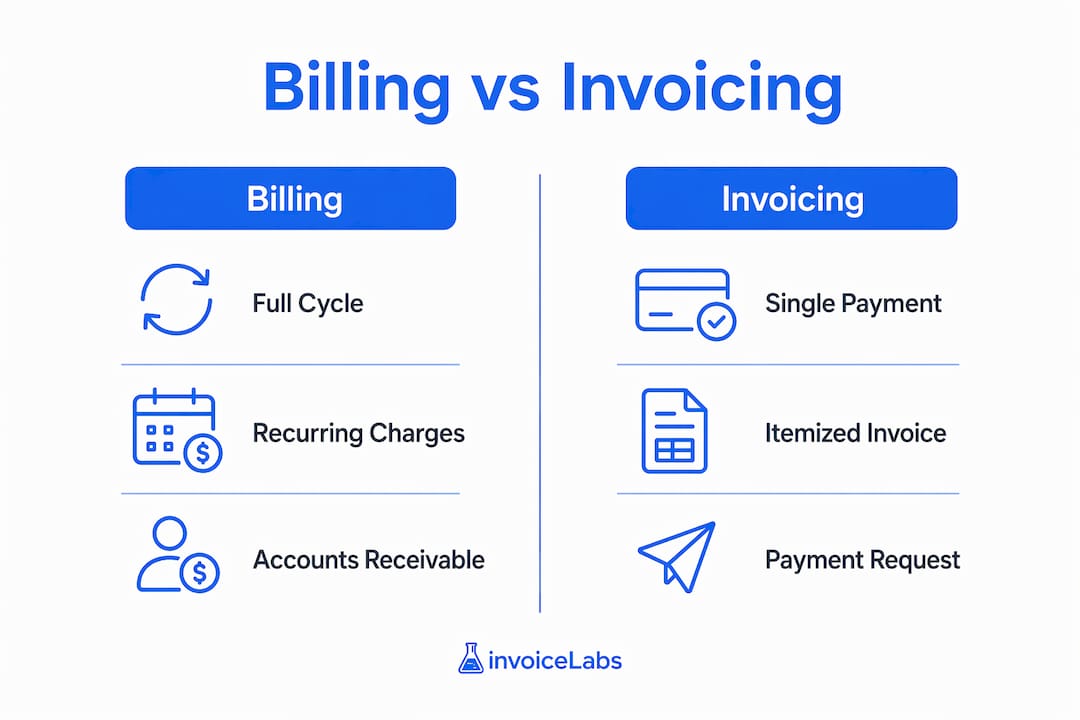
Billing and invoicing serve different functions, even though people often use the terms interchangeably. Billing covers the full payment cycle: generating charges, tracking accounts receivable, and recording what customers owe over time. Invoicing is a single step within that cycle. It produces a document that requests payment for a specific delivery of goods or services.
The distinction becomes clearest when you look at real business models.
Billing in practice:
- A SaaS company charges subscribers $49 per month automatically. The customer never receives a line-item breakdown unless they request one.
- A utility company sends a monthly statement summarizing usage and the amount due. The bill reflects a recurring cycle, not a one-time transaction.
- A gym membership platform processes AutoPay on the first of each month without any manual action from the business.
Invoicing in practice:
- A freelance designer completes a logo project and sends a document listing hours worked, the agreed rate, applicable taxes, and a due date.
- A marketing agency delivers a campaign and issues an invoice with itemized deliverables, project fees, and net-30 payment terms.
- A web developer sends a final invoice after site launch, referencing the original contract and any change orders.
The core difference comes down to timing and transaction nature. Billing supports continuous business models where charges repeat on a cycle. Invoicing fits discrete, project-based work where payment follows delivery. Choosing the wrong approach for your business model creates confusion for clients and gaps in your records.
| Dimension | Billing | Invoicing |
|---|---|---|
| Scope | Full payment cycle, recurring charges | Single payment request per transaction |
| Detail level | Often summarized | Line items, taxes, terms, due date |
| Common use case | Subscriptions, utilities, memberships | Freelance projects, B2B contracts |
| Timing | Ongoing, cyclical | After delivery of goods or services |
| Document type | Statement or bill | Invoice |

What are the essential components of a valid invoice?
A valid invoice does more than request money. It creates a legal record of the transaction and protects you if a dispute arises. Invoices must include line items, taxes, total amount, payment terms, due dates, and legal elements that meet standards like the E-Sign Act to be enforceable. Missing any of these elements can delay payment or void your claim in a dispute.
Every invoice should contain:
- Invoice number: A unique reference that links the document to your records and the client’s payment system.
- Issue date and due date: Clients need to know when the clock starts and when payment is expected.
- Itemized line items: Each service or product listed separately with quantity, rate, and subtotal.
- Tax calculations: Applicable sales tax or VAT calculated per line or as a total, depending on jurisdiction.
- Payment terms: Net-15, Net-30, or a specific date. Vague terms like “payment due soon” cause delays.
- Accepted payment methods: Bank transfer, credit card, Stripe, or check. The fewer steps a client takes to pay, the faster you get paid.
- Your business details and the client’s details: Full legal names, addresses, and contact information.
Pro Tip: Send invoices within 24 hours of completing a project. The longer you wait, the more the client’s sense of urgency fades. Prompt invoicing signals professionalism and keeps your work fresh in their mind.
Billing documentation follows a simpler structure because the charge is usually pre-agreed. A monthly bill may only show the plan name, the amount, and the due date. The goal is immediate clarity, not detailed justification. Consistency in language across all your billing documents reduces client questions and cuts down on back-and-forth emails before payment clears.
How can automation reduce billing and invoicing errors?
Manual invoice processing is the single biggest source of payment delays for small businesses and agencies. AI-driven automated invoice processing can achieve a 90% touchless invoice handling rate, eliminating most manual data entry and errors. That figure means nine out of ten invoices move from receipt to posting without a human touching them.
Automation works by combining AI, optical character recognition (OCR), and rules-based logic to parse, validate, match, and post invoices. The system reads incoming documents, extracts key fields, checks them against purchase orders or contracts, and routes exceptions to a human reviewer only when something does not match. This is called touchless invoice processing, and it replaces the manual review queue that slows most small finance teams.
“Automated billing eliminates manual calculation errors and unclear conditions, which are primary causes for client disputes and delayed payments. Centralized dashboards that track outstanding balances and aging reports offer the financial visibility needed for improved collections and operational control.” — MaxBill Expert Insights
The practical benefits for freelancers and agencies go beyond speed:
- Fewer errors: Automated systems catch mismatched amounts, duplicate invoices, and missing fields before they reach a client or accountant.
- Faster approval cycles: Auto-approval rules clear routine invoices instantly. Only exceptions require manual review.
- Better cash flow visibility: Integration with accounting platforms like QuickBooks or Xero keeps your books current without manual entry.
- Early payment discount capture: Automated systems flag invoices eligible for early payment discounts before the window closes.
- Self-service portals: Clients can view invoice history, update payment preferences, and pay online without calling your office.
Self-service client portals improve payment predictability by letting clients manage payment preferences, view history, and adopt paperless billing and AutoPay. That shift reduces your administrative workload and shortens your average collection time.
Pro Tip: When evaluating invoice management software, check whether it integrates directly with your accounting platform. A tool that requires manual export and import adds steps that defeat the purpose of automation.
What strategies reduce payment friction and improve collections?
Getting an invoice out the door is only half the job. The other half is making sure it gets paid on time. Fragmented invoices, payments, and tax records cause operational inefficiencies and revenue leakage. Unifying your billing system into one platform prevents the “billing chaos” that hits agencies and freelancers who manage clients across multiple tools.
The most effective collection strategies focus on removing obstacles between the client and the payment button.
Use automated retry logic for failed payments. Auto-retry logic for failed recurring payments recovers lost revenue by automatically retrying payments on days 3, 7, and 14 after the initial failure. For subscription-based agencies or retainer clients, this single feature can recover a meaningful share of monthly revenue without any manual follow-up.
Centralize your invoice tracking. A consolidated dashboard showing outstanding balances, aging reports, and payment status gives you the visibility to act before an invoice becomes overdue. Chasing payments reactively costs more time than monitoring proactively.
Communicate payment options clearly. Every invoice should list at least two payment methods. Clients who cannot pay by their preferred method often delay rather than switch. Offering bank transfer, credit card, and ACH covers most business clients.
Automate the cash application step. The invoice-to-cash cycle includes cash application, which means matching incoming payments to the correct invoices. Manual reconciliation creates bottlenecks. Automated systems use unique invoice reference numbers and bank feed integration to match payments instantly, keeping your accounts receivable accurate in real time.
Pro Tip: Add a unique invoice reference number to every document you send. When a client pays by bank transfer, that reference is the only way to match the payment to the correct invoice automatically. Without it, reconciliation becomes a manual guessing game.
Key Takeaways
Effective billing and invoicing requires a unified system that covers the full invoice-to-cash cycle, from document creation through payment matching and reconciliation.
| Point | Details |
|---|---|
| Billing vs. invoicing | Billing covers the full payment cycle; invoicing is a single payment request document. |
| Invoice components | Every invoice needs line items, taxes, due dates, and payment terms to be legally enforceable. |
| Automation impact | AI-driven systems can achieve 90% touchless invoice processing, cutting errors and delays. |
| Collection strategy | Auto-retry logic and self-service portals reduce failed payments and administrative workload. |
| Cash application | Automated reconciliation using unique invoice references prevents bottlenecks in accounts receivable. |
What I’ve learned from watching businesses get billing wrong
Most billing problems are not technology problems. They are process problems that technology exposes. The freelancers and agency owners I’ve seen struggle with late payments almost always share one trait: they treat invoicing as an afterthought rather than a system.
The most common mistake is delayed invoicing. A project wraps up, the client is happy, and the invoice goes out three weeks later. By then, the client’s budget cycle has moved on, approvals have closed, and your invoice sits in a queue. Send the invoice the same day you deliver the work. That single habit changes your average collection time more than any software upgrade.
The second mistake is vague payment terms. “Payment due upon receipt” means nothing to a client whose accounts payable team processes checks on net-30. Write the exact due date on every invoice. “Payment due by March 15, 2026” leaves no room for interpretation.
The third mistake is running billing and invoicing in separate tools with no connection between them. Integration of billing, invoicing, and payments into one workflow is critical for small businesses to scale and maintain accuracy in accounting. When your invoice tool does not talk to your payment processor or your accounting software, you spend hours reconciling records that should update automatically.
Automation is not a luxury for agencies billing at scale. It is the baseline for anyone who wants to spend time on client work instead of chasing payments.
— Black Flame Digital
Invoicelabs makes professional invoicing fast and trackable
Getting paid faster starts with sending better invoices. Invoicelabs lets you create a professional invoice in under 30 seconds, with real-time tax calculations and instant delivery built in. Every invoice includes status tracking so you know exactly when a client has viewed and paid.

Invoicelabs also offers profession-specific invoice templates for freelancers, agencies, consultants, and more, so your documents look consistent and professional from day one. Payments process instantly through Stripe, and bank-grade security protects every transaction. There are no hidden fees. If you want a billing setup that works without manual effort, Invoicelabs is built for exactly that.
FAQ
What is the difference between billing and invoicing?
Billing is the full process of charging customers and managing accounts receivable over time. Invoicing is the specific act of sending a payment request document for a completed transaction.
What should every invoice include?
A valid invoice must include a unique invoice number, issue and due dates, itemized line items, tax calculations, payment terms, and accepted payment methods. These elements make the document legally enforceable under standards like the E-Sign Act.
How does invoice automation work?
Automated invoice systems use AI and OCR to parse, validate, and post invoices without manual input. The best systems achieve a 90% touchless processing rate, routing only exceptions to human review.
What is cash application in the invoice-to-cash cycle?
Cash application is the step where incoming payments are matched to the correct open invoices. Automating this step with unique invoice reference numbers and bank feed integration eliminates manual reconciliation delays.
How can freelancers reduce late payments?
Send invoices within 24 hours of project delivery, state an exact due date, and offer at least two payment methods. Using a platform with invoice status tracking lets you follow up the moment an invoice goes overdue.
Recommended
Send your next invoice in seconds
Create professional invoices, track payments and get paid faster — free to start.


