Invoice Approval Workflow: How to Get Paid Faster
An invoice approval workflow is the loop your invoice travels through: you create it, send it, the client confirms it, and money lands in your account. The single fastest way to shrink that loop is to send the invoice the same day you finish the work, with a payment link already attached. Skip vague “net terms” language and give an exact due date, using Due on Receipt for small clients or Net 14 for agencies that need a processing cycle.
This guide covers:
- A legal invoice checklist that meets UK requirements
- Payment-term recommendations and a follow-up timeline
- A repeatable, step-by-step workflow with pro tips
- A free tool that builds the invoice for you in under a minute
Key Takeaways
Invoices sent the same day work is delivered, with a clear due date and a one-click payment link, get approved and paid faster than invoices that wait.
| Point | Details |
|---|---|
| Include every legal field | List invoice number, dates, parties, description, amounts, and VAT details to avoid processing delays. |
| Pick terms by client type | Use Due on Receipt for small clients and Net 14 for agencies that need a processing cycle. |
| Run the same cadence every time | Create, send to a confirmed contact, track status, and follow up starting the day after the due date. |
| Fix the four common mistakes | Confirm the billing contact, state an exact due date, describe deliverables clearly, and follow up promptly. |
| Use Invoicelabs to remove friction | Its free quick-invoice tool adds tax calculations, Stripe payment links, and automatic status tracking. |
Table of Contents
- What Fields Does Your Invoice Approval Workflow Require?
- Choosing Payment Terms and Methods That Speed Approval
- How Do You Build a Repeatable Create, Send, Track, Follow-Up Cycle?
- What Mistakes Slow Down Invoice Approval the Most?
- How Does Invoicing Software Cut Approval Friction?
- What One Small Change Actually Speeds Up Payment?
- Try the Free Invoicelabs Quick Invoice Tool
- Sources
What Fields Does Your Invoice Approval Workflow Require?
A missing field is the fastest way to stall an invoice on someone’s desk. According to Gov, every UK invoice needs a specific set of details before it can legally count as a proper invoice, let alone get processed by a client’s accounts team.
Here’s what belongs on every invoice you send:
- A unique, sequential invoice number (never reuse or skip numbers)
- Your business name and address, plus the client’s name and address
- A clear description of the goods or services provided
- The supply date (when the work was delivered) and the invoice date
- The total amount charged, broken down by item or milestone
- VAT details, if you’re VAT-registered
If you charge VAT, HMRC’s guidance requires a full VAT invoice to show your VAT registration number, itemized VAT rates, and the total VAT chargeable under regulation 14(1). Skipping this doesn’t just risk a compliance headache. It gives a client’s accounts payable team a built-in excuse to bounce your invoice back unpaid.
Format matters too. Send a PDF, not an editable Word file. Use a subject line that names the invoice number and amount, and always restate the payment method inside the email body, not just on the attachment.
Choosing Payment Terms and Methods That Speed Approval
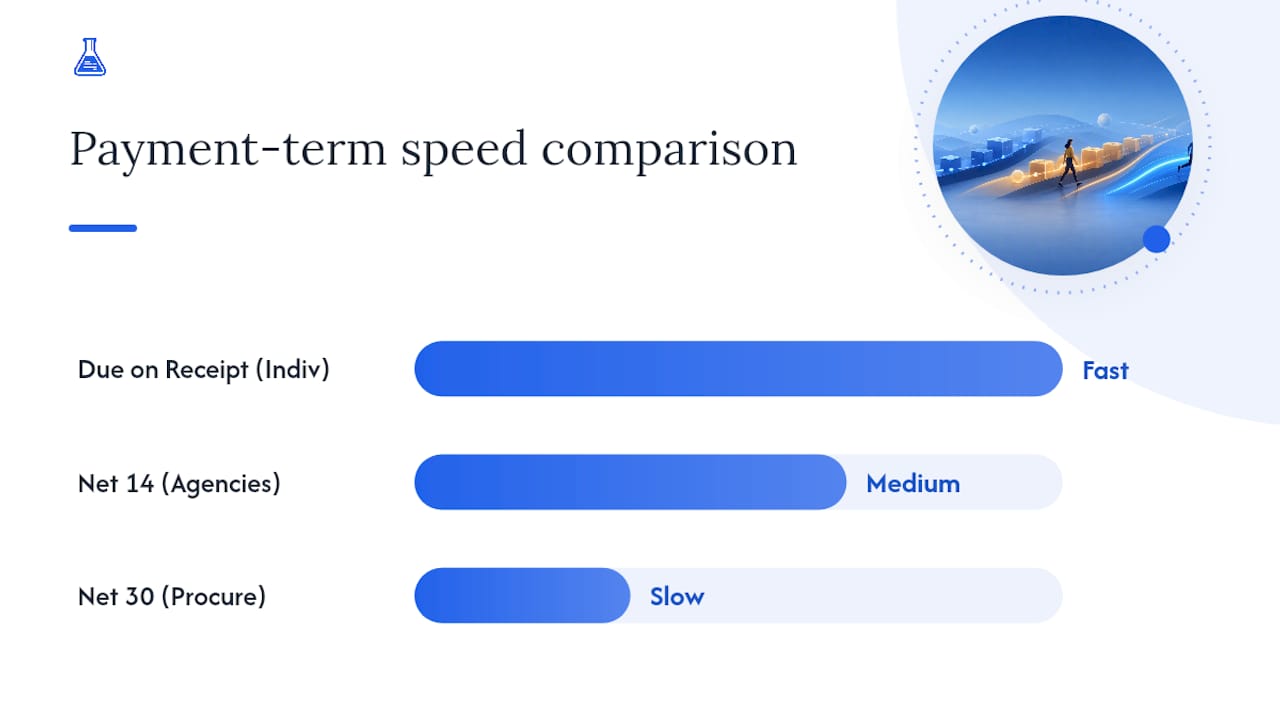
The terms you print on an invoice shape how fast it clears the client’s approval queue. Due on Receipt works best for individual clients and small one-off projects. Net 14 fits agencies and corporate clients whose finance departments run on a processing cycle, and it commonly speeds up collections without generating much client pushback when it’s framed professionally. Net 30 should be reserved for larger accounts with formal procurement, since anything longer just extends your own cash gap.

Whatever term you choose, spell out the actual calendar date, not just the label. “Payment due March 26, 2026” leaves no room for a client to claim confusion about when “net 14” actually lands.
A few practical rules for presenting payment options:
- Offer more than one payment method, but lead with the easiest one.
- A card payment link (Stripe is the standard here) usually clears faster than a bank transfer, since the client doesn’t need to log into online banking.
- Still list your bank details as a backup for clients who prefer transfers.
- For larger projects, split the invoice into a deposit and milestone payments rather than billing the full amount at the end. Our guide on payment terms examples walks through specific wording you can copy.
Pro Tip: If a client has a habit of paying late, invoice half upfront using a prepayment structure rather than waiting for the whole project to wrap before you see a cent.
How Do You Build a Repeatable Create, Send, Track, Follow-Up Cycle?
The workflow itself is simple once it’s written down. Most freelancers lose time not because the steps are hard, but because they improvise a new process every time they invoice, which is exactly where delays creep in.
Create
- Pull up a template that already has your legal fields built in: invoice number, dates, VAT line if relevant, and a payment link.
- Fill in the deliverable description and amount, and confirm the client’s billing contact and any PO number before you finalize anything.
- Export to PDF.
Send
- Email the invoice to the confirmed billing contact, not just your day-to-day project contact. Guides on freelance invoicing consistently flag confirming the right recipient as one of the simplest ways to avoid routing delays.
- Keep the email short: invoice number, amount, due date, and payment link, with the PDF attached.
Track
- Log the status: sent, viewed, approved, paid. A basic spreadsheet works, but software that updates statuses automatically saves you the manual check-ins.
Follow up
- The day after the due date, send a short, friendly reminder.
- At 3 to 5 days past due, escalate with a direct message or phone call.
- At 14 to 30 days past due, send a formal notice, and consider pausing new deliverables until the balance clears.
- Log every contact attempt so you have a paper trail if the situation escalates further.
This cadence mirrors what freelance payment workflow research recommends, and it works because it removes the guesswork about when to chase and when to let it ride one more day.
What Mistakes Slow Down Invoice Approval the Most?
Most payment delays trace back to the same handful of avoidable errors.
- No clear due date or payment link. Vague terms like “net 30” without a calendar date give clients room to deprioritize you. Missing payment instructions specifically are a well-documented cause of multi-week payment delays.
- Sending to the wrong contact. If your invoice lands with a project manager instead of accounts payable, it can sit for weeks before anyone even notices.
- Vague line items. “Consulting services, $2,000” invites questions. A short deliverable summary or proof-of-delivery note heads off the “what exactly was this for” email.
- Waiting too long to follow up. Silence past the due date reads as indifference, not patience.
Pro Tip: Confirm the billing contact and any PO number requirement in your kickoff email, before the project even starts, so it’s never a scramble at invoicing time.
How Does Invoicing Software Cut Approval Friction?
Manual invoicing multiplies every one of the mistakes above. A missed field, a stale contact, a forgotten follow-up: each one is an easy human error when you’re rebuilding an invoice from scratch every time.
Invoicelabs is built specifically to close those gaps. A few ways it changes the mechanics of the workflow:
- Instant payment links with Stripe integration mean the client can pay by card the moment they open the invoice, instead of waiting to log into a banking app.
- Real-time tax calculations prevent the VAT errors that give a client’s finance team a reason to send your invoice back for correction.
- Branded PDF templates keep every invoice looking consistent, which matters more than it sounds. A client’s AP team processes documents faster when they recognize the format on sight.
- Automated status tracking replaces the spreadsheet, showing you at a glance which invoices are sent, viewed, or paid.
Invoicelabs also offers a free quick-invoice generator built to produce a professional invoice in under 30 seconds, along with profession-specific templates so you’re never starting from a blank page.
What One Small Change Actually Speeds Up Payment?
The workflow only matters if you actually run it. The clearest pattern across freelance payment behavior is that invoices sent the same day work wraps, paired with a one-click payment option, get paid noticeably faster than invoices that sit in a drafts folder for even a day or two. Waiting breaks the client’s momentum, and momentum is most of what gets an invoice approved quickly.
[Editor’s note: author credentials and a linked case study to be added by the publisher.]
— Black Flame Digital
Try the Free Invoicelabs Quick Invoice Tool
Invoicelabs is the fastest way to put this whole workflow into practice without rebuilding a template from scratch every time you bill a client. It generates a professional, branded invoice in under 30 seconds, calculates tax in real time so nothing gets kicked back for correction, and attaches a Stripe payment link so clients can pay by card the moment they open it. Status tracking shows you exactly when an invoice was viewed and when it was paid, so you’re never guessing whether to send a reminder.

Start with the free quick-invoice generator, or grab a template built for your work: web developers, graphic designers, or consultants. If you bill different clients different ways, browse the full set of profession-based templates and send your next invoice today.
Sources
Official guidance on invoice requirements comes from GOV.UK and HMRC, alongside Stripe’s freelancer invoicing guide and TradeSmith’s UK invoice checklist.
Recommended
Send your next invoice in seconds
Create professional invoices, track payments and get paid faster — free to start.


