What Is a Delivery Receipt? A Guide for Freelancers
A delivery receipt is a signed record confirming the physical handover of goods or services, and it serves as the primary proof of delivery for billing and liability purposes. Get it right, and it speeds invoice settlement. Get it wrong, or skip it entirely, and you’re left arguing about whether a shipment arrived at all.
Here’s what a complete delivery receipt captures at a glance:
- Recipient signature (and printed name)
- Date and time of delivery
- Itemized description with quantities
- Condition notes or exception remarks
Table of Contents
- What is a delivery receipt, and why does it matter for your business?
- How a delivery receipt differs from an invoice
- Essential fields every professional U.S. delivery receipt must include
- How to capture delivery receipts: paper, digital, and ePOD
- What to do when goods are damaged, missing, or the recipient refuses to sign
- Copyable delivery receipt template and quick checklist
- How delivery receipts speed up invoicing and payment collection
- Key Takeaways
- The part most guides skip
- Invoicelabs makes it easier to close the loop on every delivery
- Useful sources and further reading
What is a delivery receipt, and why does it matter for your business?
A delivery receipt is a formal, signed document that confirms goods or services were physically transferred to the recipient. It establishes that the transaction was completed in full, in the correct quantity, and in satisfactory condition as of the date and time on the document. Think of it as the handshake that closes the loop between shipping and getting paid.

Under UCC §2-509, a signed delivery receipt can mark the exact moment risk of loss transfers from seller to buyer. An unqualified signature, meaning one with no exception notes, is treated as strong evidence of acceptance “as is.” That single legal fact has real consequences: it can make or break a damage claim, a shortage dispute, or a payment hold.
For billing, the document is just as powerful. Invoices tied to a signed receipt settle faster because the buyer has already confirmed receipt. Without one, a client can delay payment by claiming delivery was incomplete or never happened. In freight contexts, missing or incomplete receipts commonly cause small operators to lose billing disputes over accessorial charges and detention fees.
How a delivery receipt differs from an invoice
These two documents are not interchangeable, though many small-business owners treat them as if they are.
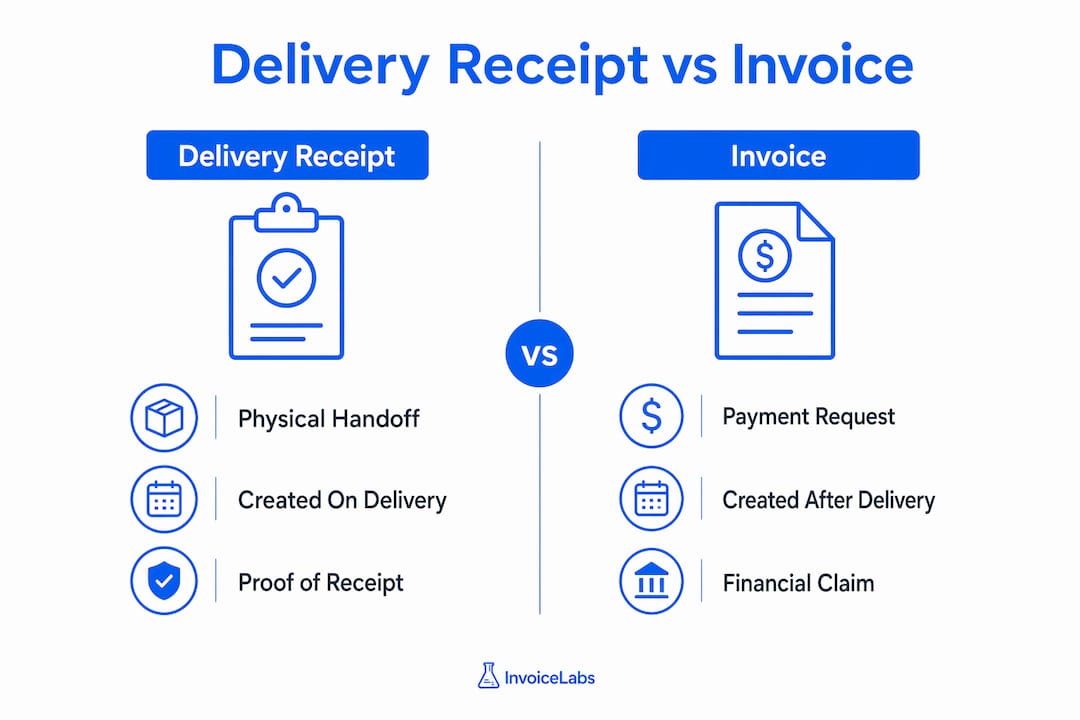
| Document | What it records | When it’s created |
|---|---|---|
| Delivery receipt | Physical handoff of goods or services, condition, and recipient acknowledgment | At the moment of delivery |
| Invoice | Monetary claim, payment terms, and line-item pricing | After delivery is confirmed |
The delivery receipt is operational confirmation. The invoice is the financial claim that follows it. They work together: the receipt proves delivery happened; the invoice states what’s owed because it did.
A practical example: a freelance photographer delivers a set of printed canvases to a client’s office. The client signs the delivery receipt noting all 12 pieces arrived undamaged. The photographer then issues an invoice referencing that receipt number. If the client later disputes the delivery, the signed receipt closes the argument before it starts. For a deeper look at how these documents fit into a broader billing workflow, the billing and invoicing guide from Invoicelabs covers the full picture.
When attaching documents to accounts-receivable records, keep the receipt and the invoice filed together under the same order or job number. That pairing is what auditors and collections teams need.
Essential fields every professional U.S. delivery receipt must include
A well-structured delivery receipt prevents weeks of back-and-forth when a shipment arrives short or damaged. These are the fields that matter:
| Field | Why it matters |
|---|---|
| Recipient name (printed) | Confirms an authorized person accepted the goods |
| Recipient signature | Legal acknowledgment of receipt under UCC principles |
| Delivery date and time | Establishes the exact moment of transfer and risk shift |
| Delivery address | Confirms goods went to the right location |
| Itemized description | Identifies exactly what was delivered |
| Quantity | Enables shortage claims if counts don’t match |
| Condition / exception notes | Preserves the right to make damage or shortage claims |
| Carrier or agent name | Identifies who completed the delivery |
| Unique document or order number | Links the receipt to the invoice and purchase order |
For digital and ePOD captures, add: GPS coordinates, photo attachments, electronic signature metadata, and a system-generated timestamp. Digital capture also reduces manual entry errors and centralizes data for real-time tracking.
Pro Tip: Add a printed-name line directly below the signature line. A signature alone is often illegible and won’t help you identify who accepted the goods if a dispute surfaces six months later.
How to capture delivery receipts: paper, digital, and ePOD
Paper receipts still work for simple, low-volume deliveries. They’re cheap, require no technology, and are universally understood. The downside: they get lost, smudged, or left unsigned when a driver is in a hurry.
Digital forms and electronic Proof of Delivery (ePOD) systems solve most of those problems. A minimum viable digital receipt includes a timestamp, a tamper-evident record, at least one photo of the delivered goods, and a captured electronic signature. Geolocation data adds another layer of defensibility if a recipient later claims delivery went to the wrong address.
For freelancers and small businesses doing field deliveries, a few practical habits make a real difference:
- Photograph the goods before handing them over, not just after.
- Capture the signature on a mobile device that auto-timestamps and syncs to cloud storage.
- If using a third-party carrier, request their signed delivery confirmation and attach it to your own records.
Modernizing with ePOD systems materially improves auditability and speeds invoice settlement. For eCommerce sellers, understanding how fulfillment invoices work alongside delivery documentation can sharpen the whole order-to-cash process.
What to do when goods are damaged, missing, or the recipient refuses to sign
This is where most small businesses lose money, not because the damage happened, but because they didn’t document it correctly at the moment of delivery.
- Note exceptions before signing. Write specific language directly on the receipt: “carton damaged, 2 units missing” or “3/12 units dented, count verified by on-site manager.” Vague notes like “possible damage” rarely hold up in claims.
- Photograph everything. Take dated photos of the damaged packaging, the goods themselves, and the delivery location. Do this before the driver leaves.
- Get a witness or initials. If someone else is present, have them initial the exception note. A second name on the document adds credibility.
- Notify the carrier immediately. Most carriers require damage claims to be filed within a short window, sometimes as few as 24–48 hours for visible damage.
- Preserve all documentation. Keep the original receipt, photos, and any carrier correspondence together and linked to the invoice record.
If a recipient refuses to sign entirely, note the refusal on the receipt, record the time and location, and photograph the goods at the delivery point. A refusal to sign does not automatically mean a refusal to accept, but it does create a factual record you can rely on later.
Pro Tip: Practitioners warn that failing to record exception notes at delivery is the single most common mistake that undermines later claims. Write the note at the door, not back at the office.
Copyable delivery receipt template and quick checklist
Copy and adapt this template for paper or digital use:
DELIVERY RECEIPT Document No.: ___________ Order / Invoice No.: ___________ Delivery Date: ___________ Time: ___________ Delivery Address: ___________
| Item Description | Qty Ordered | Qty Delivered | Condition |
|---|---|---|---|
| [Item 1] | ☐ Good ☐ Damaged | ||
| [Item 2] | ☐ Good ☐ Damaged |
Exception Notes: ___________ Carrier / Agent Name: ___________ Recipient Printed Name: ___________ Recipient Signature: ___________ Date: ___________
On-delivery checklist:
- ☐ Count items against the packing list before signing
- ☐ Photograph goods and packaging on arrival
- ☐ Write specific exception notes for any damage or shortage
- ☐ Confirm recipient’s printed name matches an authorized contact
- ☐ File the completed receipt with the associated invoice record
- ☐ Retain for at least seven years to cover IRS audit windows and common statutes of limitation
Store the completed receipt as a PDF scan alongside the invoice in your accounting system or cloud storage, named with the order number for easy retrieval.
How delivery receipts speed up invoicing and payment collection
A signed receipt attached to an invoice removes the most common reason clients delay payment: “I’m not sure everything arrived.” When the receipt is already on file, that objection disappears before it’s raised.
Practical steps for freelancers and small-business owners:
- Use a consistent naming convention. Name receipt files to match invoice numbers (e.g.,
INV-2026-047_receipt.pdf) so they’re instantly findable during a dispute or audit. - Reference the receipt on the invoice. Add a line item note or footer: “Delivery confirmed per Receipt No. [X], dated [date].” Clients who see that reference know the delivery is documented.
- Link photos to the receipt record. Store delivery photos in the same folder or cloud record as the signed receipt. If a client raises a damage claim, you have everything in one place.
Attaching a signed delivery receipt to your invoice isn’t just good housekeeping. It signals to the client that the transaction is complete and documented, which shortens the mental distance between “invoice received” and “payment sent.”
Invoicelabs supports this workflow directly. You can create a professional invoice in under 30 seconds, attach PDF receipts, and track payment status in real time, so you always know whether a client has opened the invoice and whether payment is on the way. Faster confirmation of delivery plus faster invoice delivery equals a shorter collection cycle. For more on managing cash flow through tighter invoicing practices, the cash flow management guide from Invoicelabs is worth a read.
Key Takeaways
A signed, complete delivery receipt is the single most effective document for protecting payment rights and resolving disputes before they escalate.
| Point | Details |
|---|---|
| Sign with exceptions, not blind | An unqualified signature under UCC §2-509 signals acceptance “as is” and limits future claims. |
| Include nine core fields | Recipient name, signature, date/time, address, itemized description, quantity, condition notes, carrier name, and document number. |
| Go digital when possible | ePOD systems with timestamps, photos, and geolocation improve auditability and speed invoice settlement. |
| Retain for a period that aligns with IRS audit windows and common statutes of limitation | |
| Use Invoicelabs to close the loop | Attach PDF receipts to invoices and track payment status in real time to shorten collection cycles. |
The part most guides skip
Most articles about delivery receipts treat them as a logistics formality. They’re not. For freelancers and small-business owners, a delivery receipt is a billing instrument. The moment a client signs it, you have documented evidence that your obligation is complete. That’s the trigger for payment, and it’s the document that makes a collections conversation short.
The mistake I see most often isn’t skipping the receipt entirely. It’s completing it halfway: no printed name, no exception notes, no document number that ties back to the invoice. A receipt with a signature but no item counts is nearly as weak as no receipt at all, because you can’t prove what was delivered, only that something was.
One habit worth building: before every delivery, assign the receipt a number that matches your invoice. File them together the same day. That single discipline, done consistently, eliminates most of the reconciliation headaches that slow down payment.
Invoicelabs makes it easier to close the loop on every delivery
Delivery receipts protect your right to get paid. Invoicelabs makes sure the invoice that follows actually gets paid, fast.

With Invoicelabs, you can generate a professional invoice in under 30 seconds, attach your signed delivery receipt as a PDF, and send it the moment delivery is confirmed. Payment status tracking shows you exactly when a client opens the invoice, so you know when to follow up and when to move on.
- Attach receipts directly to invoices so clients see proof of delivery alongside the payment request, removing the most common reason for delays.
- Track invoice status in real time and collect card payments via Stripe, so the gap between delivery and payment shrinks to hours, not weeks.
Create your first invoice free and see how pairing a signed receipt with a tracked invoice changes how fast you get paid.
Useful sources and further reading
- UCC §2-509 (risk of loss) — Cornell Law School’s Legal Information Institute; the primary U.S. statutory text on risk transfer at delivery.
- IRS recordkeeping guidance — IRS.gov; the basis for the seven-year retention recommendation.
- LegalClarity: Delivery receipt template — practical field-by-field template guidance.
- LaneProof: Delivery receipts in freight disputes — covers how missing receipts affect billing disputes in freight contexts.
- FreightPros: Delivery exception guidance — practitioner advice on writing effective exception notes.
- Invoicelabs billing and invoicing guide — practical invoicing workflow guidance for freelancers and small businesses.
- Black Flame Digital — editorial team behind this article; additional invoicing and billing resources available on the Invoicelabs blog.
This article is general information, not legal or financial advice. Confirm current rules with a qualified professional or the relevant primary source for your specific situation.
Recommended
Send your next invoice in seconds
Create professional invoices, track payments and get paid faster — free to start.


