Automatic Tax on Invoices: How VAT Is Calculated in the UK
Automatic Tax on Invoices: How VAT Is Calculated in the UK

In the UK, “tax on an invoice” almost always means VAT, and invoicing software can work it out for you. It applies the right rate to each line, adds the VAT to the total and shows it as a separate figure. You still decide whether you should charge VAT at all and which rate fits what you sell. We built InvoiceLabs so the calculation happens in real time as you type, which means you only make the decisions and the sums are done.
TL;DR
- Only VAT-registered businesses charge VAT. You must register once your taxable turnover passes £90,000 over 12 months.
- The rates are 20% (standard), 5% (reduced) and 0% (zero). They were confirmed unchanged for 2026-27 and 2027-28.
- Software does the arithmetic, but the rate, your VAT number and the tax point are your responsibility.
- Do not show VAT on an invoice until you have your VAT registration number.
- From 1 April 2029, VAT invoices between UK VAT-registered businesses are due to become e-invoices, according to Autumn Budget 2026 coverage.
Table of Contents
- What “automatic tax” actually does on an invoice
- Do you need to charge VAT at all?
- Which rate applies to your invoice
- The sums, with worked examples
- What a UK VAT invoice must show
- Can you invoice before you are paid?
- When the VAT on an invoice is wrong
- What is changing: Making Tax Digital and e-invoicing
- Why we think the calculation belongs in your invoicing tool
- Put the calculation on autopilot
- FAQ
- Sources
What “automatic tax” actually does on an invoice
No UK system adds VAT to your invoices by itself. Tax appears only when you or your software apply it. GOV.UK’s guide to charging VAT says that, as a VAT-registered business, you work out the VAT-inclusive price at the correct rate, show the VAT separately on the invoice with your VAT number, and record the sale in your VAT account and on your VAT return.
Invoicing software takes over the repetitive part:
- You choose a rate for each line (20%, 5%, 0% or exempt).
- The software works out the VAT on each line and the invoice total.
- Discounts are applied before the tax is calculated, so the totals stay consistent.
- The VAT figure is shown separately, as the rules require.
In InvoiceLabs, tax and discount calculations update in real time as you edit the invoice. That removes the most common manual errors: a rate typed in wrongly, a total that no longer matches its lines, or a discount applied on the wrong side of the VAT.
Do you need to charge VAT at all?
This is the first decision, and no software can make it for you.
The registration threshold
You must register for VAT if your taxable turnover for the last 12 months goes over £90,000, or if you expect it to go over that in the next 30 days. HMRC’s registration guidance gives the timing: register within 30 days of the end of the month you went over. Your registration takes effect on the first day of the second month after you crossed the line. For example, if you passed the threshold on 15 July, you register by 30 August and the effective date is 1 September.
The Autumn Budget 2026 VAT announcements keep the registration threshold at £90,000, with a deregistration threshold of £88,000 from April 2027. You can also register voluntarily below the threshold, which some freelancers do when most of their clients are VAT-registered businesses.
Before you have a VAT number
VAT Notice 700/1 (updated 5 August 2026) says you must not show VAT as a separate item on an invoice until you have received your registration number. Once you have it, you should send the necessary VAT invoices within 30 days. If you register late, you pay VAT on sales made since you should have registered, and a penalty may apply. If you are close to the threshold, track your rolling 12-month turnover monthly rather than annually.
Which rate applies to your invoice
GOV.UK’s VAT rates page sets out three rates:
| Rate | Percentage | Typical use |
|---|---|---|
| Standard | 20% | Most goods and services, including most freelance and agency work |
| Reduced | 5% | Items such as children’s car seats and home energy |
| Zero | 0% | Items such as most food and children’s clothes |
Some supplies are exempt, such as postage stamps and certain financial and property transactions. Exempt and zero-rated are not the same thing. Zero-rated sales are still taxable supplies at 0%, while exempt supplies sit outside VAT charging. GOV.UK’s guidance on VAT rates for different goods and services (10 July 2026) adds that a rate can depend on who is supplying and who is buying, where the supply is made, and the precise nature of the supply. It also depends on whether you hold the necessary evidence and records.
For most consultants, designers, developers and agencies selling services in the UK, the standard 20% rate is the one that applies. If you sell to customers abroad, the treatment differs, and our guide to international invoicing from the UK covers VAT, currency and getting paid.
The sums, with worked examples
HMRC’s charging VAT page gives the formulas that software applies for you:
- Add 20% VAT: multiply the net price by 1.2. A £60 chair becomes £72.
- Add 5% VAT: multiply by 1.05. A £200 car seat becomes £210.
- Remove VAT: divide by 1.2 or 1.05. A £180 table is £150 net plus £30 VAT.
Here is a freelancer’s invoice with a discount, to show why the order of operations matters:
| Line | Net |
|---|---|
| Brand strategy workshop | £800.00 |
| Design revisions (4 hours at £75) | £300.00 |
| Subtotal | £1,100.00 |
| 10% discount | -£110.00 |
| Net after discount | £990.00 |
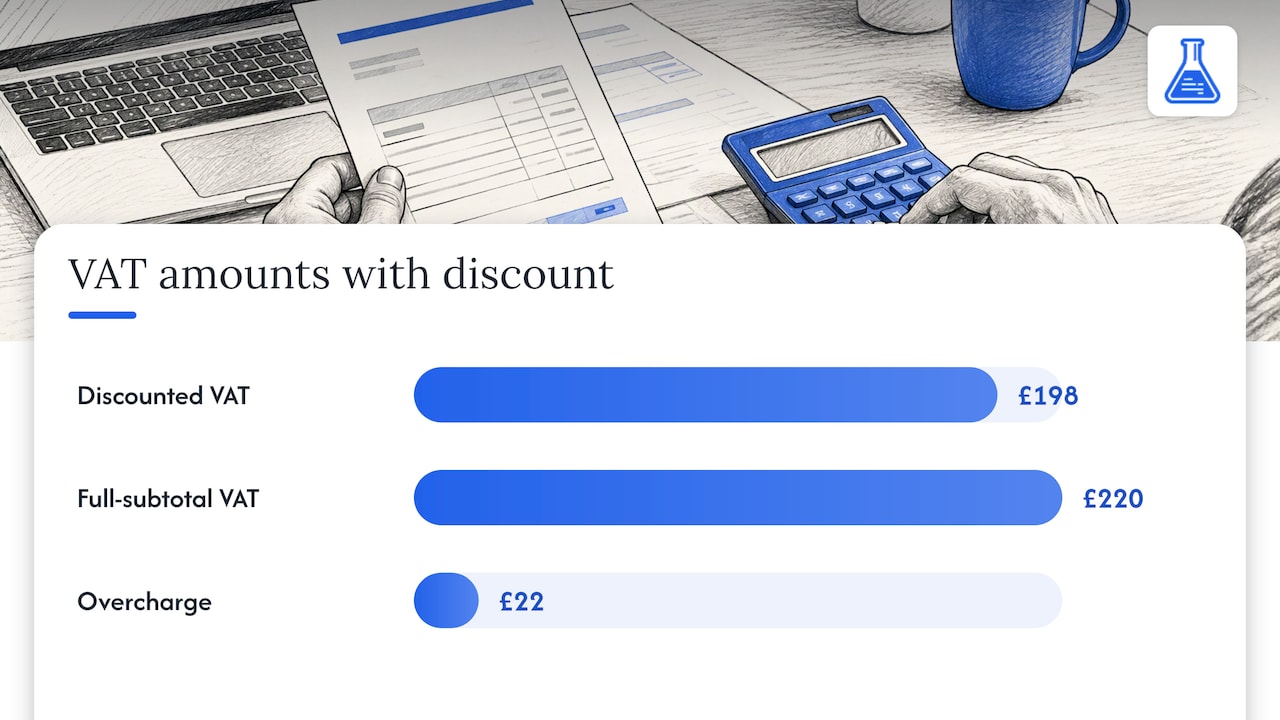
| VAT at 20% | £198.00 |
| Total due | £1,188.00 |
The VAT is charged on the discounted net figure of £990, not on £1,100. If you worked it out by hand and taxed the full subtotal, you would show £220 of VAT and overcharge by £22. Multiply that by dozens of invoices and the errors add up.
With mixed rates, each line needs its own treatment. An invoice with a 20% service line and a 0% line should show VAT per rate, and a calculator that applies one rate to the whole invoice gets it wrong.
What a UK VAT invoice must show
The calculation is only part of a valid invoice. VAT Notice 700 requires:
- a unique sequential invoice number
- the time of supply (the tax point), and the date of issue if different
- your name, address and VAT registration number
- the customer’s name and address
- a description of the goods or services
- for each line, the quantity, the VAT rate and the amount excluding VAT
- the total excluding VAT, the rate of any cash discount, and the total VAT chargeable in sterling
For supplies of £250 or less including VAT, a simplified VAT invoice is allowed. It shows your name, address and VAT number, the time of supply, a description, and for each rate the total including VAT in sterling and the rate charged.
GOV.UK’s invoice guidance says VAT invoices are needed when both you and your customer are VAT registered. We have written a checklist on the mandatory fields of a UK VAT invoice and a guide to where the VAT number goes.
Can you invoice before you are paid?
Yes. Notice 700 says a VAT invoice should normally be issued within 30 days of the tax point. Issuing an invoice before the basic tax point, or within 14 days after it, can itself create the tax point, so invoicing ahead of payment is permitted and common. The practical effect is that you account for VAT based on the invoice, not on when the money arrives, unless you use a scheme that says otherwise. If you issue a pro forma first, read how to convert a pro forma into a compliant VAT invoice, because you cannot reclaim VAT on a pro forma.
When the VAT on an invoice is wrong
Mistakes happen, and the rules are specific. According to Notice 700:
- If you charged too much VAT, you account for the higher amount unless you correct it with your customer by issuing a credit note.
- If you charged too little, you account for the correct amount whether or not you correct it.
- Errors in net value up to £10,000 can be fixed on your current VAT return. Errors over £50,000, or deliberate errors, must be reported to HMRC separately.
Keep your records properly as well. GOV.UK’s record-keeping rules require digital records of VAT on supplies, kept for at least 6 years. If you are unsure about a particular rate or a large correction, speak to an accountant or HMRC before you send the invoice.
What is changing: Making Tax Digital and e-invoicing
All VAT-registered businesses should now be signed up for Making Tax Digital for VAT, which means keeping digital VAT records and filing returns through compatible software. Making Tax Digital for Income Tax is being phased in for around 2.7 million sole traders and landlords, beginning April 2026.
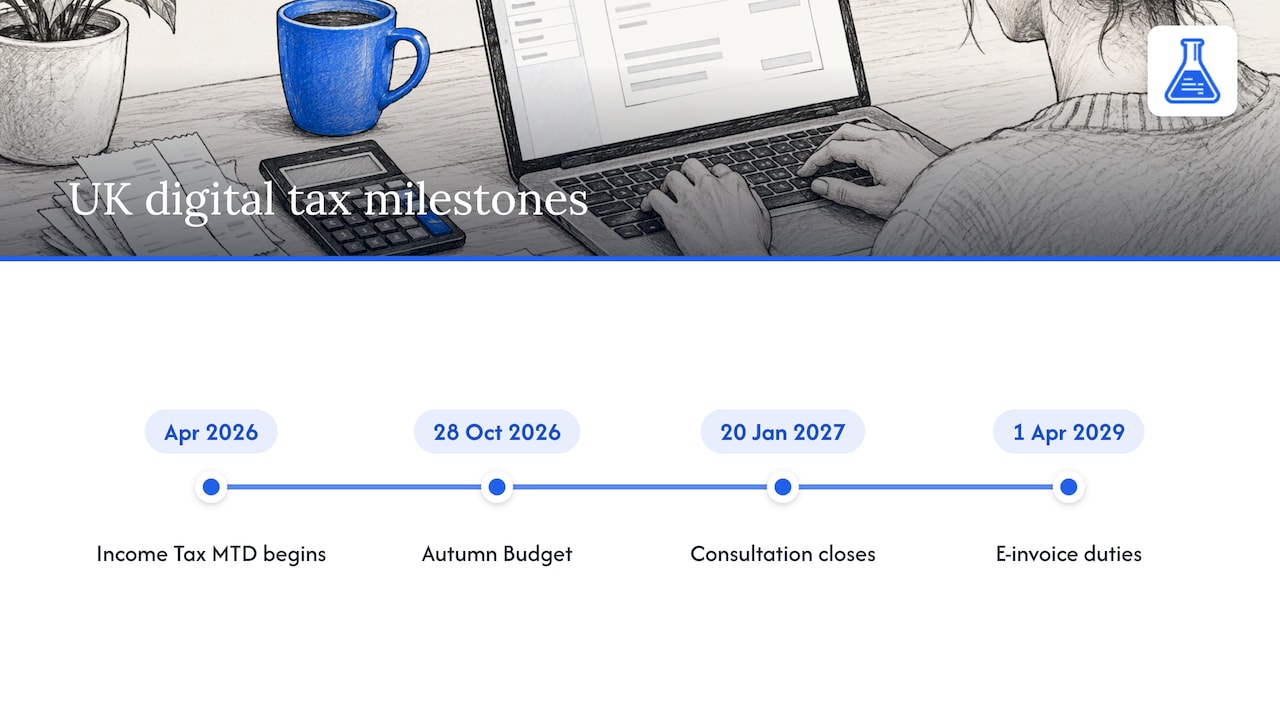
The Autumn Budget on 28 October 2026 went further. Coverage of the Budget says that from 1 April 2029, VAT-registered businesses must be able to receive e-invoices and must issue VAT invoices as e-invoices to other UK VAT-registered businesses, with consumer and cross-border sales excluded. A separate digital reporting consultation runs until 20 January 2027, and the same analysis notes that much operational detail has yet to be published. Our explainer on PDF versus e-invoice sets out what this means for freelancers and small firms.
Why we think the calculation belongs in your invoicing tool
Most invoice mistakes we hear about are not about tax law. They are about arithmetic and habit: the wrong rate left on from the last client, a discount taxed in the wrong order, a total retyped by hand.
We designed InvoiceLabs around the idea that a professional should be able to create an invoice in under 30 seconds. Real-time tax and discount calculations are part of that: you pick the rate, and the totals follow. The invoice is delivered instantly, you can track its status, and with Stripe a client can pay by card straight away, so the money arrives sooner.
The decisions stay with you, as they should. But the work of getting the numbers right on every invoice should not.
Black Flame Digital
Put the calculation on autopilot
If you invoice regularly, InvoiceLabs applies your tax and discounts as you type, adds your logo and colours so every invoice looks like yours, supports multiple currencies, and lets you download a PDF. You can start on the Free plan at £0 per month, which allows limited usage. Paid plans are Starter at £9 per month, Professional at £19 per month and Business at £49 per month, and they unlock more clients, companies and unlimited invoices. If you take card payments through Stripe on an invoice, the fee is 1%.
For a one-off invoice, the free invoice generator works without an account. If you are comparing options first, see our comparison of invoicing software in the UK.
FAQ
Is tax automatic in the UK?
No. VAT is charged only by VAT-registered businesses, and you must apply it to your invoices yourself or through software. Software can calculate and display it automatically once you choose the rate.
What is legally required on an invoice in the UK?
Every invoice needs a unique number, your name and contact details, the customer’s name and address, a description of what you charge for, the supply date, the invoice date, the amounts, the VAT amount if applicable and the total owed, as GOV.UK explains. A VAT invoice needs more, including your VAT number.
Can a tax invoice be generated before payment?
Yes. A VAT invoice is normally issued within 30 days of the tax point, and invoicing before payment is permitted and common. The invoice itself can set the tax point.
Does automatic VAT mean I never need to check the rate?
The software does the arithmetic, but you choose the rate. Most professional services take the 20% standard rate, while exempt and zero-rated supplies are treated differently. If your situation is unusual, ask an accountant or HMRC.
Sources
- Charge, reclaim and record VAT: Charging VAT, GOV.UK
- VAT rates, GOV.UK
- Register for VAT, GOV.UK
- VAT Notice 700/1, GOV.UK
- VAT rates on different goods and services, GOV.UK
- VAT guide (VAT Notice 700), GOV.UK
- Record keeping (VAT Notice 700/21), GOV.UK
- Invoices: what they must include, GOV.UK
- Keeping VAT records, GOV.UK
- Making Tax Digital for VAT software, GOV.UK
- Backing your business: policy annex, GOV.UK
- Autumn Budget 2026: VAT announcements, VAT Clinic
- UK Budget 2026: VAT Special, VAT Clinic
Recommended
Send your next invoice in seconds
Create professional invoices, track payments and get paid faster — free to start.